
Agent Harness学习-工具分发
Agent Harness学习-工具分发
在上一篇笔记中,我们只是简单提供了调用bash的函数,虽然仅bash就可以完成大量任务,但只有 bash 时, 所有操作都走 shell,cat 截断不可预测, sed 遇到特殊字符就崩, 每次 bash 调用都是不受约束的安全面
而使用专用工具 (read_file, write_file) 可以在工具层面做路径沙箱
接下来我们要实现根据大模型的需求调用不同的工具:
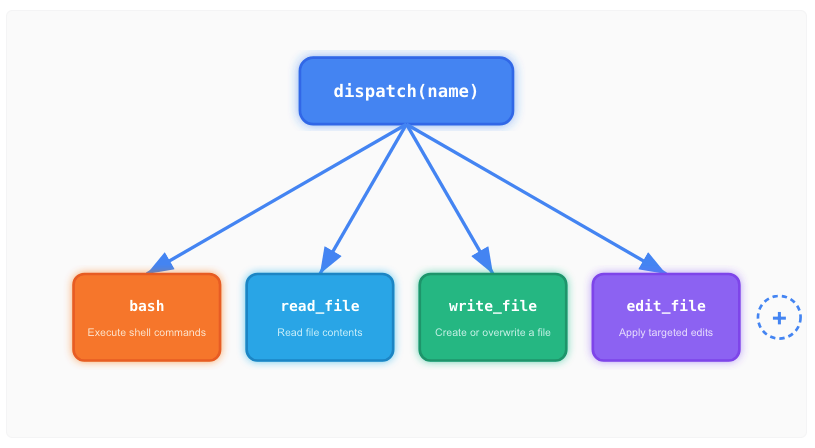
我们的loop变成了这样:
+--------+      +-------+       +------------------+
|  User  | ---> |  LLM  | --->  | Tool Dispatch    |
| prompt |      |       |       | {                |
+--------+      +---+---+       |   bash: run_bash |
                    ^           |   read: run_read |
                    |           |   write: run_wr  |
                    +-----------+   edit: run_edit |
                    tool_result | }                |
                                +------------------+
这里可以看到,需要真正新增的是三块:更多工具 schema、更多 handler、路径沙箱
开发
dispatch实现
每个工具有一个处理函数;文件类工具先过路径沙箱,防止逃逸工作区:
func safePath(p string) (string, error) {
	candidate := p
	if !filepath.IsAbs(candidate) {
		candidate = filepath.Join(WORKDIR, candidate)
	}
	absPath, err := filepath.Abs(candidate)
	if err != nil {
		return "", err
	}
	rel, err := filepath.Rel(WORKDIR, absPath)
	if err != nil {
		return "", err
	}
	if rel == ".." || strings.HasPrefix(rel, ".."+string(filepath.Separator)) {
		return "", fmt.Errorf("Path escapes workspace: %s", p)
	}
	return absPath, nil
}

func runRead(path string, limit *int) string {
	fp, err := safePath(path)
	if err != nil {
		return "Error: " + err.Error()
	}
	data, err := os.ReadFile(fp)
	if err != nil {
		return "Error: " + err.Error()
	}
	text := strings.ReplaceAll(string(data), "\r\n", "\n")
	lines := strings.Split(text, "\n")
	if text == "" {
		lines = []string{}
	}
	if limit != nil && *limit < len(lines) {
		lines = append(lines[:*limit], fmt.Sprintf("... (%d more lines)", len(lines)-*limit))
	}
	output := strings.Join(lines, "\n")
	if len(output) > maxOutputChars {
		return output[:maxOutputChars]
	}
	return output
}
dispatch map 将工具名映射到处理函数:
var TOOL_HANDLERS = map[string]toolHandler{
	"bash": func(kw map[string]any) string {
		command, ok := getString(kw, "command")
		if !ok {
			return "Error: missing command"
		}
		return runBash(command)
	},
	"read_file": func(kw map[string]any) string {
		path, ok := getString(kw, "path")
		if !ok {
			return "Error: missing path"
		}
		limit, hasLimit := getInt(kw, "limit")
		if hasLimit {
			return runRead(path, &limit)
		}
		return runRead(path, nil)
	},
	"write_file": func(kw map[string]any) string { ... },
	"edit_file":  func(kw map[string]any) string { ... },
}
Loop中按名称查找处理函数,整体逻辑不变,只有工具执行段从“调用runBash”变成“dispatch”。
for _, block := range resp.Content {
  toolUse, ok := block.AsAny().(anthropic.ToolUseBlock)
  if !ok {
    continue
  }
  var input map[string]any
  _ = json.Unmarshal(toolUse.Input, &input)
  handler := TOOL_HANDLERS[toolUse.Name]
  output := ""
  if handler == nil {
    output = fmt.Sprintf("Unknown tool: %s", toolUse.Name)
  } else {
    output = handler(input)
  }
  fmt.Printf("\033[33m> %s:\033[0m\n", toolUse.Name)
  if len(output) > 200 {
    fmt.Printf("\033[33m%s...\033[0m\n", truncateString(output, 200))
  } else {
    fmt.Printf("\033[33m%s\033[0m\n", truncateString(output, 200))
  }
  results = append(results, anthropic.NewToolResultBlock(toolUse.ID, output, false))
}
如此就完成了工具分发功能的新增
关于schema
每个工具都为输入参数定义了严格的 JSON schema,包括 properties + required。例如,edit_file 要求 old_text 和 new_text 是精确的字符串,而非正则表达式,缺字段或类型不对会在工具调用前被拦掉(模型很难传“结构错”的输入),edit_file 最终走 runEdit(path, oldText, newText) ,内部用 strings.Index 找“精确子串”,再做一次替换,没有任何正则解析
这消除了一整类错误:模型无法传递格式错误的输入,因为 API 会在执行前校验 schema。这也使模型的意图变得明确——当它用特定字符串调用 edit_file 时,不存在关于它想修改什么的解析歧义
运行
完成上述任务后,我们尝试运行调用不同的工具:
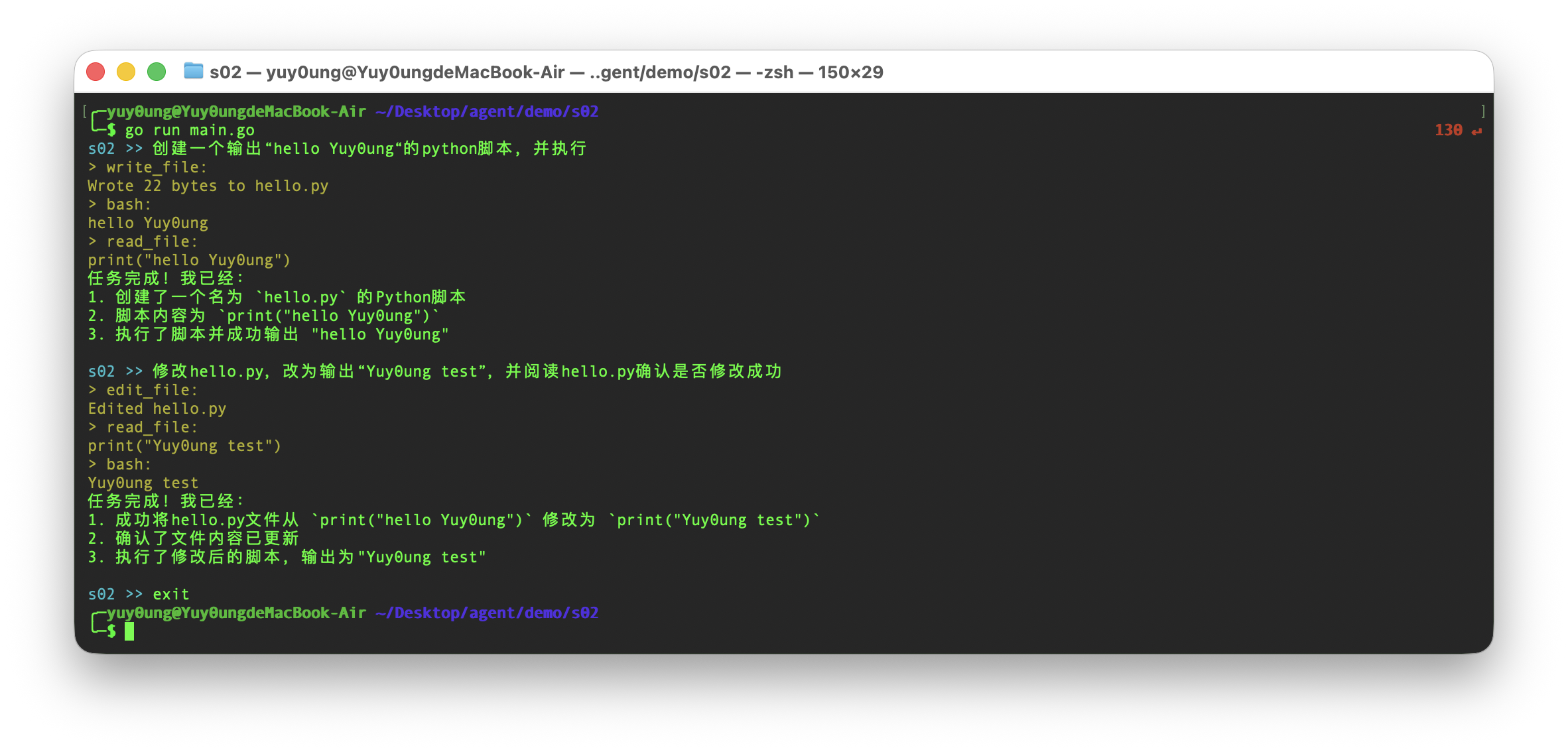
经验证,现在的Agent具备了读文件、创建文件、编辑文件、执行命令的能力,我们的tool dispatch实现得非常成功