
java基础demo
java基础demo
记录基础学习时写的demo,复习基础
helloworld
package com.yuy0ung.test01;

/**
 * @author Yuy0ung
 */
public class HelloWorld4 {
    public static void main(String[] args) {
        System.out.println("hello world");
        System.out.println("hello world");
    }
}
变量
package com.yuy0ung.test01;

public class TestVar {
    public static void main(String[] args) {
        //定义年龄变量
        int age;
        //同时定义多个
        int a,b;
        //赋值
        age = 18;
        age = 19;
        age = 18 + 19;

        //变量定义+赋值
        int age1 = 19;
        int age2 = 18,age3 = 20;
        int age4,age5 = 30;//这里age5被赋值但age4没有

        //变量使用
        System.out.println(age);
        System.out.println(age+10);
        System.out.println(age+age3);
    }
}
基本数据类型
package com.yuy0ung.test01;

public class TestType {
    public static void main(String[] args) {
        //整数
        byte a = 10;//-128~127
        short b = 20;//正负3w
        int c = 30;//正负21亿
        long d = 4000000L;///大得很...(超过int范围加L)

        //浮点
        float e = 3.14f;//结尾要f
        double f = 3.14;

        //字符
        char g = 'Y';//单引号括起来的单个字符
        System.out.println("Yuy0ung");//字符串是多个字符拼接
        //布尔
        boolean h = true;
    }
}
算术运算符
package com.yuy0ung.test01;

public class TestOpe {
    public static void main(String[] args) {
        System.out.println(+10);
        System.out.println(1+2);
        int num = 10;
        //从左到右运算,包括类型
        System.out.println("这是一个数"+num);
        System.out.println(500+20+"Yuy0ung");
        System.out.println("Yuy0ung"+5+20);
        num++;//自增
        int a = 0;
        ++a;//自增
        System.out.println(num);
        System.out.println(a);

        int b = 0;
        int c = 0;
        System.out.println(b++);//先运算后自增
        System.out.println(b);
        System.out.println(++c);//先自增后运算
    }
}
赋值运算符
package com.yuy0ung.test01;

public class TestOpe2 {
    public static void main(String[] args) {
        //赋值
        int num1 = 1;
        int num2 = 2;
        int num3 = 10 + 30;

        //求和
        int sum = 0;
        sum = sum + num1;
        sum = sum + num2;
        sum += num3;
        System.out.println("和:" + sum);
    }
}
关系运算符
package com.yuy0ung.test01;

public class TestOpe3 {
    public static void main(String[] args) {
        //关系运算符
        System.out.println(1 == 2);
        System.out.println(1 == 1);

        //逻辑运算符
        System.out.println(true&&true);
        System.out.println(true&&false);
        System.out.println(false&&false);
        System.out.println(false&&true);

        System.out.println(false||false);
        System.out.println(true||true);
        System.out.println(true||false);

    }
}
流程控制
if
package com.yuy0ung.test02;

public class TestIf01 {
    public static void main(String[] args) {

        int num = 18;
        if (num > 10) {
            System.out.println("大于10");
        }

        if (num < 10) {
            System.out.println("小于10");
        }
        else {
            System.out.println("大于10");
        }

        if (num < 18) {
            System.out.println("小于18");
        } else if (num > 18) {
            System.out.println("大于18");
        } else {
            System.out.println("等于18");
        }
    }
}
while
package com.yuy0ung.test02;

public class TestWhile {
    public static void main(String[] args) {
        int i = 1;
        while (i < 10) {
            i++;
            System.out.println(i);
        }
    }
}
for
package com.yuy0ung.test02;

public class TestFor {
    public static void main(String[] args) {
        int a = 10;
        for (int i = 0; i < 10; i++) {
            System.out.println(a);
        }
    }
}
方法&重载
package com.yuy0ung.test04;

public class TestMethod {
    //提取一个方法,用于求和
    public static int addNum(int a, int b) {
        int c = a + b;
        return c;
    }

    //方法重载,方法名相同,形参列表不同
    public static void addNum(int a, int b, int c) {
        System.out.println(a+b+c);
    }

    public static void main(String[] args) {
        int sum = addNum(1, 2);
        System.out.println(sum);
        System.out.println(addNum(4, 5));

        addNum(6, 7,8);

    }
}
数组
package com.yuy0ung.test05;

public class TestArray {
    public static void main(String[] args) {
        //int 为例
        int[] arr;//定义
        arr = new int[4];//创建长度为四
        //创建后有默认值0

        //赋值
        arr[0] = 1;
        arr[1] = 2;
        arr[2] = 3;
        arr[3] = 4;

        //使用
        System.out.println(arr[0]);
        System.out.println(arr[1] + 3);

        //遍历
        for (int i = 0; i < arr.length; i++) {
            System.out.println("第"+(i+1)+"个元素为:"+arr[i]);
        }

        //for-each
        for (int num : arr) {
            System.out.println(num);
        }
    }
}
练习
翻转整数
给定一个 32 位有符号整数,将整数中的数字进行反转。
示例 1:
输入: 123
输出: 321
示例 2:
输入: -123
输出: -321
如果反转后整数溢出那么就返回 0。
demo:
public class ReverseInteger {
    public static void main(String[] args) {
        int x = 123;
        int y = -123;
        System.out.println(reverse(x));
        System.out.println(reverse(y));
    }

    //如果反转后整数溢出那么就返回0
    public static int reverse(int x) {
        int rev = 0;
        while (x != 0) {
            int pop = x % 10;
            x /= 10;

            // 检查溢出:如果 rev > Integer.MAX_VALUE/10 或 rev < Integer.MIN_VALUE/10,则会溢出
            if (rev > Integer.MAX_VALUE / 10 || (rev == Integer.MAX_VALUE / 10 && pop > Integer.MAX_VALUE % 10)) return 0;
            if (rev < Integer.MIN_VALUE / 10 || (rev == Integer.MIN_VALUE / 10 && pop < Integer.MIN_VALUE % 10)) return 0;
            rev = rev * 10 + pop;
        }
        return rev;
    }
}
面向对象
基础创建
Person类:
package com.yuy0ung.test06;

/**
 * 人类
 */
public class Person {
    //特性(属性)
    String name;
    int age;
    double height;

    //行为(方法)
    //学习的方法
    public void study() {
        System.out.println("我学,我practice,我每天到晚就酷酷学,我随时库库练!");
    }
}
Test测试类:
package com.yuy0ung.test06;

/**
 * 测试类
 */
public class Test {
    public static void main(String[] args) {
        //创建Person的对象
        Person p1 = new Person();
        //对属性赋值
        p1.name = "6s6";
        p1.age = 18;
        p1.height = 170.3;

        //读取属性
        System.out.println(p1.name);
        System.out.println(p1.age);
        System.out.println(p1.height);

        //调用方法--学习
        p1.study();
    }
}
构造器
尽量保持空构造器存在(即使默认有隐式创建了构造器)
Person类
package com.yuy0ung.test06;

/**
 * 人类
 */
public class Person {
    //特性(属性)
    String name;
    int age;
    double height;

    //行为(方法)
    //学习的方法
    public void study() {
        System.out.println("我学,我practice,我每天到晚就酷酷学,我随时库库练!");
    }

    //alt+insert快速添加构造器
    //显式编写构造器,不定义返回值
    public Person(){
        System.out.println("111");
    }

    //重载构造器
    public Person(String name, int age, double height) {
        this.name = name;
        this.age = age;
        this.height = height;
    }
}
Test02测试类:
package com.yuy0ung.test06;

public class Test02 {
    public static void main(String[] args) {
        //创建Person对象
        Person p = new Person();
        p.name = "Yuy0ung";
        p.age = 18;
        p.height = 174.2;

        Person p2 = new Person("Yuy0ung的gf", 18, 164.2);
        System.out.println(p2.name);
    }
}
封装
Girl类
package com.yuy0ung.Test07;

public class Girl {
    //属性:
    private int age;
    //给age提供赋值和读取值的方法
    public void setAge(int age) {
        if (age > 30) {
            this.age = 18;
        }
        else {
            this.age = age;
        }

    }

    public int getAge() {
        return age;
    }
}
Test测试类
package com.yuy0ung.Test07;

public class Test {
    public static void main(String[] args) {
        //创建对象
        Girl g = new Girl();
        g.setAge(28);
        System.out.println(g.getAge());
    }
}
Person类:
package com.yuy0ung.Test07;

public class Person {
    private int age;
    private String name;
    private double height;

    //alt+insert快速生成getter和setter

    public int getAge() {
        return age;
    }

    public String getName() {
        return name;
    }

    public double getHeight() {
        return height;
    }

    public void setAge(int age) {
        this.age = age;
    }

    public void setName(String name) {
        this.name = name;
    }

    public void setHeight(double height) {
        this.height = height;
    }
}
继承
父类Person
package com.yuy0ung.test08;

public class Person {
    //父类公共的属性
    private String name;
    private int age;
    private double height;

    //构造器,mac是cmd+n
    public String getName() {
        return name;
    }

    public int getAge() {
        return age;
    }

    public double getHeight() {
        return height;
    }

    public void setName(String name) {
        this.name = name;
    }

    public void setAge(int age) {
        this.age = age;
    }

    public void setHeight(double height) {
        this.height = height;
    }

    //吃饭
    public void eat() {
        System.out.println("我吃吃吃");
    }
    //说话
    public void speak() {
        System.out.println("我说说说");
    }
     //睡觉
    public void sleep() {
        System.out.println("zzzZZZ");
    }
}
子类Student
package com.yuy0ung.test08;

public class Student extends Person {
    //继承父类Person
    //定义额外属性、方法
    private int sno;

    public int getSno() {
        return sno;
    }

    public void setSno(int sno) {
        this.sno = sno;
    }

    public void Study() {
        System.out.println("我学学学");
    }
}
测试类Test:
package com.yuy0ung.test08;

public class Test {
    public static void main(String[] args) {
        //定义子类对象
        Student s = new Student();
        s.setSno(2023122068);
        s.setAge(18);
        s.setHeight(174.4);
        s.setName("Yuy0ung");

        s.Study();
        s.eat();
        s.sleep();
        s.speak();

    }
}
实现代码复用,多态的基础
方法的重写
Person类:
package com.yuy0ung.test09;

public class Person {
    public void eat() {
        System.out.println("我吃吃吃");
    }
}
继承的学生类:
package com.yuy0ung.test09;

public class Student extends Person {
    public void eat() {
        System.out.println("我不仅吃,我还喝快哉快哉酒");
    }
}
测试类Test:
package com.yuy0ung.test09;

public class Test {
    public static void main(String[] args) {
        //创建学生对象
        Student s = new Student();
        s.eat();
    }
}
- 方法重载:在同一类中,同一方法,不同形参列表
- 方法重写:父子类中,子类对父类的方法内容进行重写
多态
用于提高代码扩展性,指的是方法的多态而不是属性,就是不同对象的同名行为的表现状态不同
前提:
- 继承
- 重写
- 父类引用了指向子类的对象(如此调用子类重写的方法)
女孩Girl类:
package com.yuy0ung.test10;

public class Girl {
    //玩
    public void play(Animal animal) {
        animal.shout();
    }

}
父类Animal:
package com.yuy0ung.test10;

public class Animal {
    //叫
    public void shout() {
        System.out.println("我叫");
    }
}
子类1,Cat:
package com.yuy0ung.test10;

public class Cat extends Animal {
    //重写
    public void shout() {
        System.out.println("喵~");
    }
    //抓挠
    public void scratch() {
        System.out.println("挠你!");
    }
}
子类2,Dog:
package com.yuy0ung.test10;

public class Dog extends Animal {
    //重写
    public void shout() {
        System.out.println("汪汪");
    }

  	//保安(^_^)
    public void guard() {
        System.out.println( "我正在看家护院...");
    }
}
异常处理
try、catch、finally
package com.yuy0ung.test11;

public class Test01 {
    public static void main(String[] args) {
        try {
            //两个数求商
            int num1 = 12;
            int num2 = 0;
            System.out.println("商:" + num1 / num2);
        } catch (Exception ex) {
            System.out.println("程序错误");
        } finally {
            System.out.println("始终都会执行finally");
        }


    }
}
Throw、throws
package com.yuy0ung.test11;

public class Test02 {
    public static void main(String[] args) throws Exception {
        devide();
    }

    //两数相处的方法
    public static void devide() throws Exception {
        int num1 = 12;
        int num2 = 0;
        if (num2 == 0) {
            //人为制造异常
//            try {
//                throw new Exception();
//            } catch (Exception e) {
//                System.out.println("这里用try-catch异常处理");
//            }
            throw new Exception();
        }else {
            System.out.println("商:" + num1 / num2);
        }
    }
}
Throw在方法内部,throws在方法声明处
throw + 异常对象,throws + 异常类型
throw:异常出现的源头,制造异常的地方;throws:在方法声明处声明可能的异常,调用者要么自己处理,要么向外抛出
集合
ArrayList
package com.yuy0ung.test12;

import java.util.ArrayList;

public class Test {
    public static void main(String[] args) {
        //定义一个集合
        ArrayList list = new ArrayList();
        System.out.println(list);
        //增加元素
        list.add("Yuy0ung");
        list.add("Yuy1ung");
        list.add("Yuy2ung");
        list.add("Yuy3ung");
        System.out.println(list);

        //删除
        list.remove("Yuy1ung");
        System.out.println(list);

        //改
        list.set(0, "Yuy4ung");
        System.out.println(list);

        //查看
        System.out.println(list.get(2));

        //遍历
        for(int i = 0;i < list.size();i++) {
            System.out.println(list.get(i));
        }

    }
}
书店demo
作为快速复习了java基础的一点小实践
菜单
首先完成脚本的菜单栏,用于呈现和选择各种功能点:
package com.yuy0ung.test13;

import java.util.Scanner;

import static javafx.application.Platform.exit;

public class Test {
    public static void main(String[] args) {
        //打印菜单
        while(true) {
            System.out.println("这里是Yuy0ung的书店");
            System.out.println("1.展示书籍");
            System.out.println("2.上架图书");
            System.out.println("3.下架图书");
            System.out.println("4.退出程序");
            System.out.println("请输入想要使用的功能序号");
            //键盘录入,使用scanner类
            Scanner scanner = new Scanner(System.in);
            //录入序号
            int choice = scanner.nextInt();
            if (choice == 1) {
                System.out.println("------展示书籍:");
            } else if (choice == 2) {
                System.out.println("------上架图书:");
            } else if (choice == 3) {
                System.out.println("------下架图书:");
            } else if (choice == 4) {
                System.out.println("------退出");
                break;
            }
        }
    }
}
功能点完善
创建一个书籍Book类:
package com.yuy0ung.test13;

public class Book {
    //属性
    private int bId;
    private String bName;
    private String bAuthor;

    public int getbId() {
        return bId;
    }

    public String getbName() {
        return bName;
    }

    public String getbAuthor() {
        return bAuthor;
    }

    public void setbId(int bId) {
        this.bId = bId;
    }

    public void setbName(String bName) {
        this.bName = bName;
    }

    public void setbAuthor(String bAuthor) {
        this.bAuthor = bAuthor;
    }

    public Book(int bId, String bName, String bAuthor) {
        this.bId = bId;
        this.bName = bName;
        this.bAuthor = bAuthor;
    }

    public Book() {

    }
}
然后完善Test方法:
package com.yuy0ung.test13;

import java.util.ArrayList;
import java.util.Scanner;

import static javafx.application.Platform.exit;

public class Test {
    public static void main(String[] args) {
        ArrayList books = new ArrayList();//用于存储书籍的数组
        //打印菜单
        while(true) {
            System.out.println("这里是Yuy0ung的书店");
            System.out.println("1.展示书籍");
            System.out.println("2.上架图书");
            System.out.println("3.下架图书");
            System.out.println("4.退出程序");
            System.out.println("请输入想要使用的功能序号");
            //键盘录入,使用scanner类
            Scanner scanner = new Scanner(System.in);
            //录入序号
            int choice = scanner.nextInt();
            if (choice == 1) {
                System.out.println("------展示书籍:");
                for(int i = 0; i < books.size(); i++) {
                    Book book = (Book) books.get(i);
                    System.out.println(book.getbId()+"---"+book.getbName()+"---"+book.getbAuthor());
                }
            } else if (choice == 2) {
                System.out.println("------上架图书:");
                System.out.println("请输入书籍编号:");
                int bId = scanner.nextInt();
                System.out.println("请输入书籍名称");
                String bName = scanner.next();
                System.out.println("请输入书籍作者");
                String bAuthor = scanner.next();
                //创建书籍对象
                Book book = new Book(bId, bName, bAuthor);

                books.add(book);//添加书籍进入集合

            } else if (choice == 3) {
                System.out.println("------下架图书:");
                System.out.println("输入删除书籍编号");
                int delId = scanner.nextInt();
                //删除
                for(int i = 0; i < books.size(); i++) {
                    Book book = (Book) books.get(i);
                    if(book.getbId() == delId) {
                        books.remove(i);
                    }
                }
            } else if (choice == 4) {
                System.out.println("------退出");
                break;
            }
        }
    }
}
完成
I/O流
输入输出(相对于程序而言)
流的类型很多:
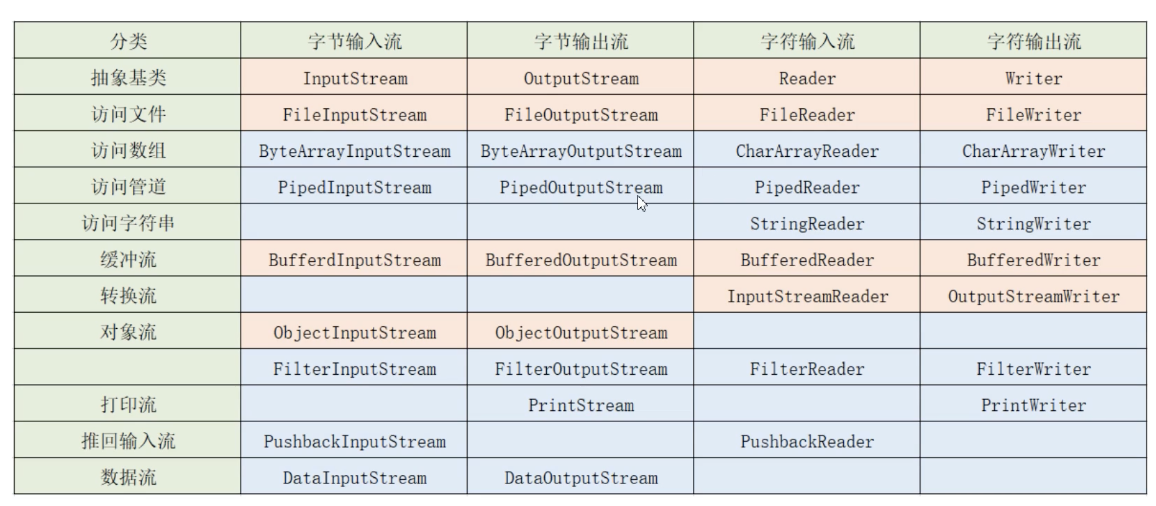
大同小异
文件字符输入流
从txt读字符串
package com.yuy0ung.test14;

import java.io.File;
import java.io.FileNotFoundException;
import java.io.FileReader;
import java.io.IOException;

public class Test01 {
    public static void main(String[] args) throws IOException {
        //对文件进行封装为File类对象
        File file = new File("/Users/yuy0ung/1.txt");

        //输入输出(字符)流
        FileReader fr = new FileReader(file);

        //读,循环
        int n1 = fr.read();
        while (n1 != -1) {
            System.out.println(n1);
            n1 = fr.read();
        }

        //关闭流
        fr.close();


    }
}
文件字符输出流
字符串写入文件
package com.yuy0ung.test14;

import java.io.File;
import java.io.FileWriter;
import java.io.IOException;

public class Test02 {
    public static void main(String[] args) throws IOException {
        String str = "Yuy0ung你好";
        //文件
        File file = new File("/Users/yuy0ung/2.txt");

        //字符输出流
        FileWriter fw = new FileWriter(file);

        //输出
        fw.write(str);

        //关闭
        fw.close();

    }
}
书店demo2
上面的书店使用数组存储数据,但是这样没有办法永久保存,程序一旦关闭,数据就会丢失,此时就可以运用I/O流将文件数据存储进文件
选定对象流:
- FileInputStream
- FileOutputStream
- ObjectInputStream
- ObjectOutputStream
还需要序列化,实现了Serializable接口才具备将对象输出到文件的能力:
Implements Serializable
Test类:
package com.yuy0ung.test15;

import java.io.*;
import java.util.ArrayList;
import java.util.Scanner;

public class Test {
    public static void main(String[] args) throws IOException, ClassNotFoundException {

        //打印菜单
        while(true) {
            System.out.println("这里是Yuy0ung的书店");
            System.out.println("1.展示书籍");
            System.out.println("2.上架图书");
            System.out.println("3.下架图书");
            System.out.println("4.退出程序");
            System.out.println("请输入想要使用的功能序号");
            //键盘录入,使用scanner类
            Scanner scanner = new Scanner(System.in);
            //录入序号
            int choice = scanner.nextInt();
            if (choice == 1) {
                System.out.println("------展示书籍:");

                //从文件读取
                File file = new File("/Users/yuy0ung/books.txt");

                //判断文件是否存在
                if(file.exists() == true) {
                    //存在
                    //输入流
                    FileInputStream fis = new FileInputStream(file);
                    ObjectInputStream ois = new ObjectInputStream(fis);

                    //读取集合
                    ArrayList books = (ArrayList)(ois.readObject());

                    for(int i = 0; i < books.size(); i++) {
                        Book book = (Book) books.get(i);
                        System.out.println(book.getbId()+"---"+book.getbName()+"---"+book.getbAuthor());
                    }
                }else {
                    System.out.println("未上新书籍,请先上新书籍");
                }
            } else if (choice == 2) {
                System.out.println("------上架图书:");
                System.out.println("请输入书籍编号:");
                int bId = scanner.nextInt();
                System.out.println("请输入书籍名称");
                String bName = scanner.next();
                System.out.println("请输入书籍作者");
                String bAuthor = scanner.next();
                //创建书籍对象
                Book book = new Book(bId, bName, bAuthor);

                //从文件读取
                File file = new File("/Users/yuy0ung/books.txt");

                //判断文件是否存在
                if(file.exists() == true) {
                    //存在
                    //输入流
                    FileInputStream fis = new FileInputStream(file);
                    ObjectInputStream ois = new ObjectInputStream(fis);

                    //读取集合
                    ArrayList books = (ArrayList)(ois.readObject());

                    //追加书籍
                    books.add(book);

                    //写入文件
                    FileOutputStream fos = new FileOutputStream(file);
                    ObjectOutputStream oos = new ObjectOutputStream(fos);

                    //写出
                    oos.writeObject(books);

                    //关闭流
                    oos.close();
                }else {


                    ArrayList books = new ArrayList();//用于存储书籍的数组
                    books.add(book);//添加书籍进入集合


                    FileOutputStream fos = new FileOutputStream(file);
                    ObjectOutputStream oos = new ObjectOutputStream(fos);

                    //写出
                    oos.writeObject(books);

                    //关闭流
                    oos.close();
                }
            } else if (choice == 3) {
                System.out.println("------下架图书:");
                System.out.println("输入删除书籍编号");
                int delId = scanner.nextInt();

                //读取
                File file = new File("/Users/yuy0ung/books.txt");
                //输入流
                FileInputStream fis = new FileInputStream(file);
                ObjectInputStream ois = new ObjectInputStream(fis);

                //读取集合
                ArrayList books = (ArrayList)(ois.readObject());

                //删除
                for(int i = 0; i < books.size(); i++) {
                    Book book = (Book) books.get(i);
                    if(book.getbId() == delId) {
                        books.remove(i);
                    }
               }

                //写入
                FileOutputStream fos = new FileOutputStream(file);
                ObjectOutputStream oos = new ObjectOutputStream(fos);

                //写出
                oos.writeObject(books);

                //关闭流
                oos.close();
            } else if (choice == 4) {
                System.out.println("------退出");
                break;
            }
        }
    }
}
给Book类加上serializable接口:
package com.yuy0ung.test15;

import java.io.Serializable;

public class Book implements Serializable {
    //属性
    private int bId;
    private String bName;
    private String bAuthor;

    public int getbId() {
        return bId;
    }

    public String getbName() {
        return bName;
    }

    public String getbAuthor() {
        return bAuthor;
    }

    public void setbId(int bId) {
        this.bId = bId;
    }

    public void setbName(String bName) {
        this.bName = bName;
    }

    public void setbAuthor(String bAuthor) {
        this.bAuthor = bAuthor;
    }

    public Book(int bId, String bName, String bAuthor) {
        this.bId = bId;
        this.bName = bName;
        this.bAuthor = bAuthor;
    }

    public Book() {

    }
}
多线程
继承thread类
实现runnable接口
实现callable接口
这里简单实现一下继承的:
Test类:
package com.yuy0ung.test16;

public class Test {
    public static void main(String[] args) {
        //主线程的任务
        for(int i = 1; i <= 20; i++) {
            System.out.println("main--------"+i);
        }

        //创建子线程对象
        TestThread t1 = new TestThread();
        //启动线程
        t1.start();//启动会和主线程争抢资源

        for(int i = 1; i <= 20; i++) {
            System.out.println("main---main--"+i);
        }
    }
}
子线程TestThread类:
package com.yuy0ung.test16;

/**
 * 线程类
 */
public class TestThread extends Thread {
    //线程对应任务放进一个方法

    @Override
    public void run() {
        //输出10个数
        for (int i = 1; i < 20; i++) {
            System.out.println("zixiancheng------"+i);
        }
    }
}
网络编程
socket套接字
链接应用层和传输层,实现客户端和服务端的通信
客户端:
package com.yuy0ung.test17;

import java.io.*;
import java.net.Socket;

public class TestClient {
    public static void main(String[] args) throws IOException {
        System.out.println("client start");
        //套接字:指定服务器IP端口号
        Socket s = new Socket("192.168.51.2", 8001);
        //输出流传输数据
        OutputStream os = s.getOutputStream();
        DataOutputStream dos = new DataOutputStream(os);
        //传输数据:
        dos.writeUTF("hello");

        //接受响应
        InputStream is = s.getInputStream();
        DataInputStream dis = new DataInputStream(is);

        //输出
        String str = dis.readUTF();
        System.out.println("Server:"+str);

        //流、网络资源关闭
        dos.close();
        s.close();
    }
}
服务端:
package com.yuy0ung.test17;

import java.io.*;
import java.net.ServerSocket;
import java.net.Socket;

public class TestServer {
    public static void main(String[] args) throws IOException {
        System.out.println("Server start...");
        // 套接字
        ServerSocket ss = new ServerSocket(8001);

        //等待客户端发送数据
        Socket s = ss.accept();

        // 输入流
        InputStream is = s.getInputStream();
        DataInputStream dis = new DataInputStream(is);

        // 接受client数据
        String str = dis.readUTF();
        System.out.println("client:"+str);

        //响应
        OutputStream os = s.getOutputStream();
        DataOutputStream dos = new DataOutputStream(os);
        dos.writeUTF("copy that");

        //关闭
        dos.close();
        dis.close();
        s.close();
        ss.close();

    }

}
XML
基本样式:
<?xml version="1.0" encoding="utf-8" ?>
<!--
注释:
verison:版本号
encoding:文档编码信息
-->
<student>
    <student id="1">
        <name>Yuy0ung</name>
        <sex>男</sex>
        <age>19</age>
    </student>
    <student id="2">
        <name>fpc</name>
        <sex>男</sex>
        <age>20</age>
    </student>
    <student id="3">
        <name>ljc</name>
        <sex>男</sex>
        <age>20</age>
    </student>
</student>
注解
package com.yuy0ung.test19;

/**
 * @author Yuy0ung
 * @version 1.0
 */

public class Test {
    /**
     *
     * @param a 求和第一个变量
     * @param b 求和第二个变量
     * @return 返回值
     */
    public int add(int a, int b) {
        return a + b;
    }
}
重写:
package com.yuy0ung.test19;

public class Person {
    public void eat() {
        System.out.println("eat");
    }
}
override
package com.yuy0ung.test19;

public class Student extends Person {
    @Override
    public void eat() {
        super.eat();
    }
}